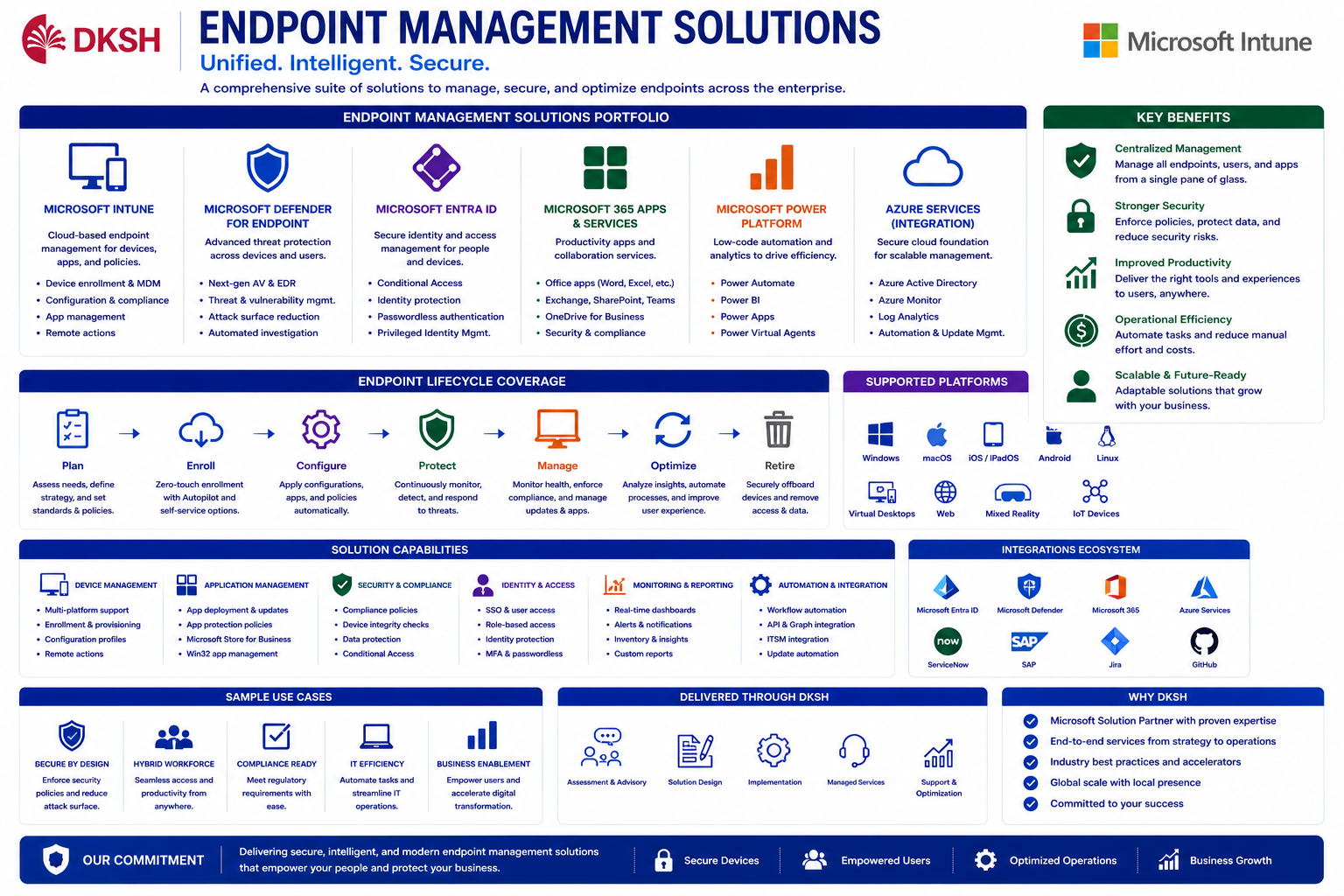
Endpoint Management
with Ms. Intune
Overview
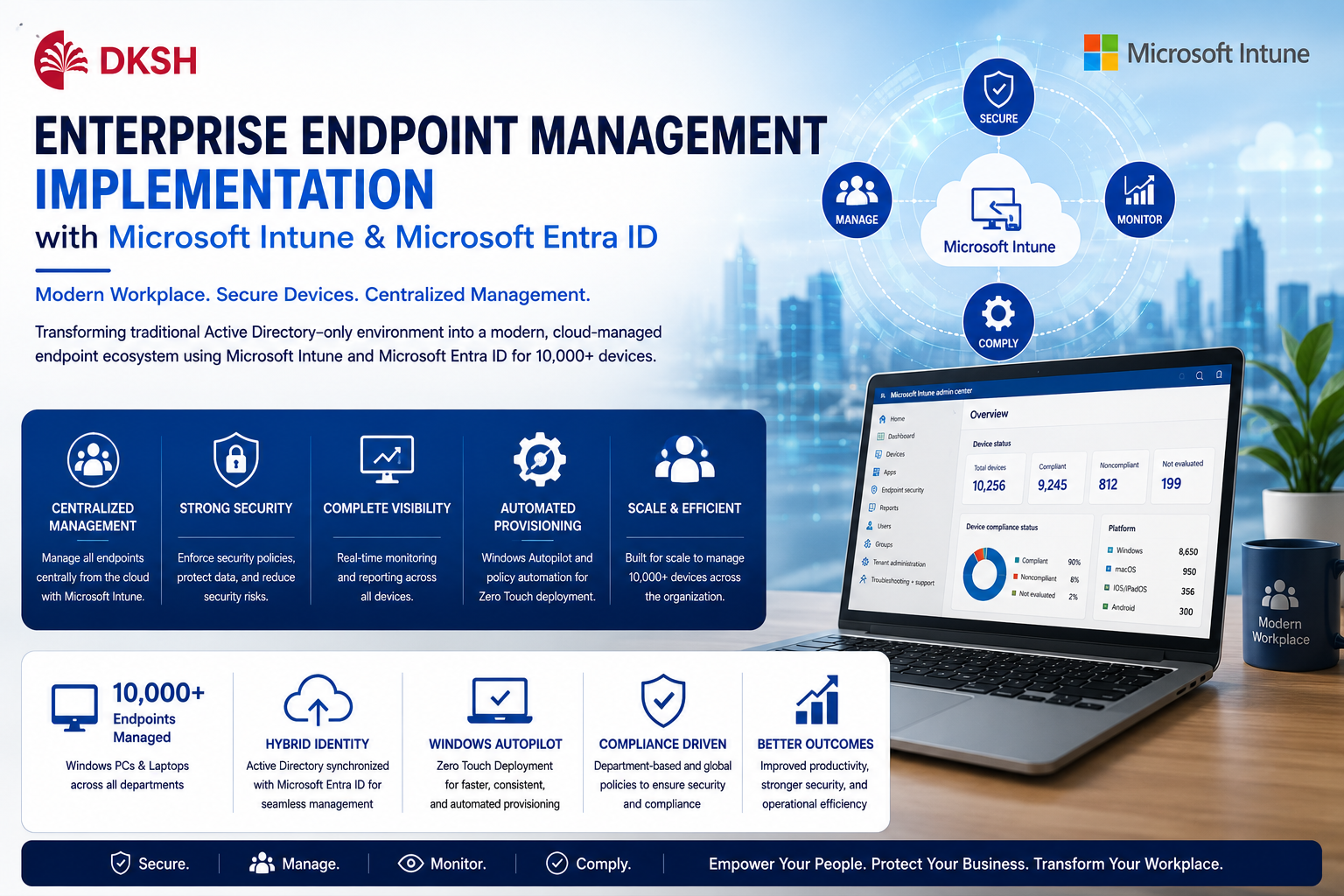
This project focused on transforming traditional endpoint management into a modern cloud-managed enterprise endpoint ecosystem using Microsoft Intune, Microsoft Entra ID, Hybrid Active Directory integration, and Windows Autopilot.
Previously, endpoint management relied heavily on traditional Active Directory, manual provisioning, Group Policy management, and decentralized operational administration. The organization required a centralized modern workplace platform capable of managing, securing, monitoring, and automating more than 10,000 enterprise endpoints across multiple departments and operational locations.
The implementation introduced Hybrid Identity architecture where Windows PCs and laptops joined Active Directory, synchronized automatically into Microsoft Entra ID, and enrolled directly into Microsoft Intune using automatic MDM enrollment mechanisms.
Microsoft Intune became the centralized endpoint management platform for compliance governance, configuration management, endpoint security, software deployment, Windows Update management, and operational monitoring.
Department-based compliance policies were implemented to ensure each business unit received different configurations, restrictions, applications, and operational security controls according to organizational requirements.
Global enterprise security baselines were also implemented to maintain standardized security posture across all devices organization-wide.
Windows Autopilot was activated to support Zero Touch Deployment, automated provisioning, dynamic device assignment, automatic policy deployment, and standard application installation during out-of-box setup processes.
As Senior Specialist Digital Workplace, responsibilities included endpoint architecture planning, Microsoft Entra integration, Azure AD Connect synchronization, Microsoft Intune implementation, Autopilot provisioning, compliance governance, policy standardization, application deployment, operational automation, and centralized endpoint administration for more than 10,000 enterprise devices.
Role
Senior Specialist Digital Workplace
Project Type
Enterprise Endpoint Management
Company
DKSH Indonesia
Business & Technical Challenges
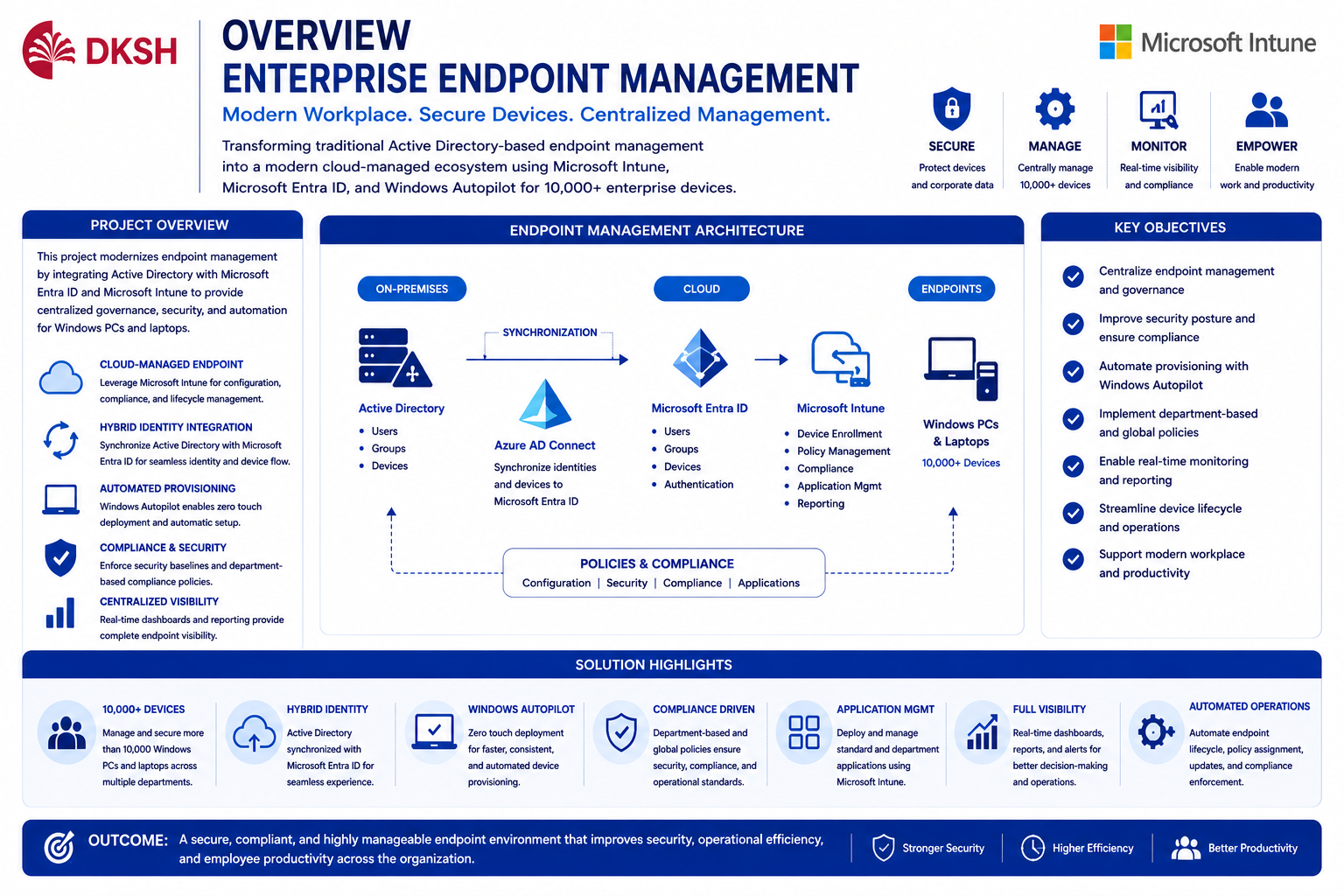
One of the biggest challenges during implementation was modernizing endpoint management infrastructure while maintaining compatibility with the existing Active Directory environment and enterprise operational standards.
The organization managed more than 10,000 Windows devices across multiple departments, requiring scalable endpoint governance, centralized compliance monitoring, and automated provisioning processes.
Existing operational processes still relied heavily on manual deployment, traditional Group Policy Objects (GPO), decentralized application management, and limited visibility into endpoint compliance status.
Additional challenges included:
- Managing Hybrid Identity synchronization between Active Directory and Microsoft Entra ID
- Standardizing endpoint configurations across different business departments
- Automating device enrollment and provisioning
- Creating department-specific compliance policies
- Migrating operational governance from traditional GPO towards cloud-managed policies
- Managing device lifecycle automation for onboarding and offboarding processes
- Maintaining operational stability during large-scale endpoint transformation
10,000+ Endpoint Devices
Managing enterprise-scale endpoint infrastructure across multiple departments and operational locations.
Hybrid Identity Integration
Synchronizing Active Directory with Microsoft Entra ID and Intune enrollment.
Compliance Governance
Implementing department-based and global compliance policies.
Automation Transformation
Replacing manual provisioning with automated cloud-managed deployment workflows.
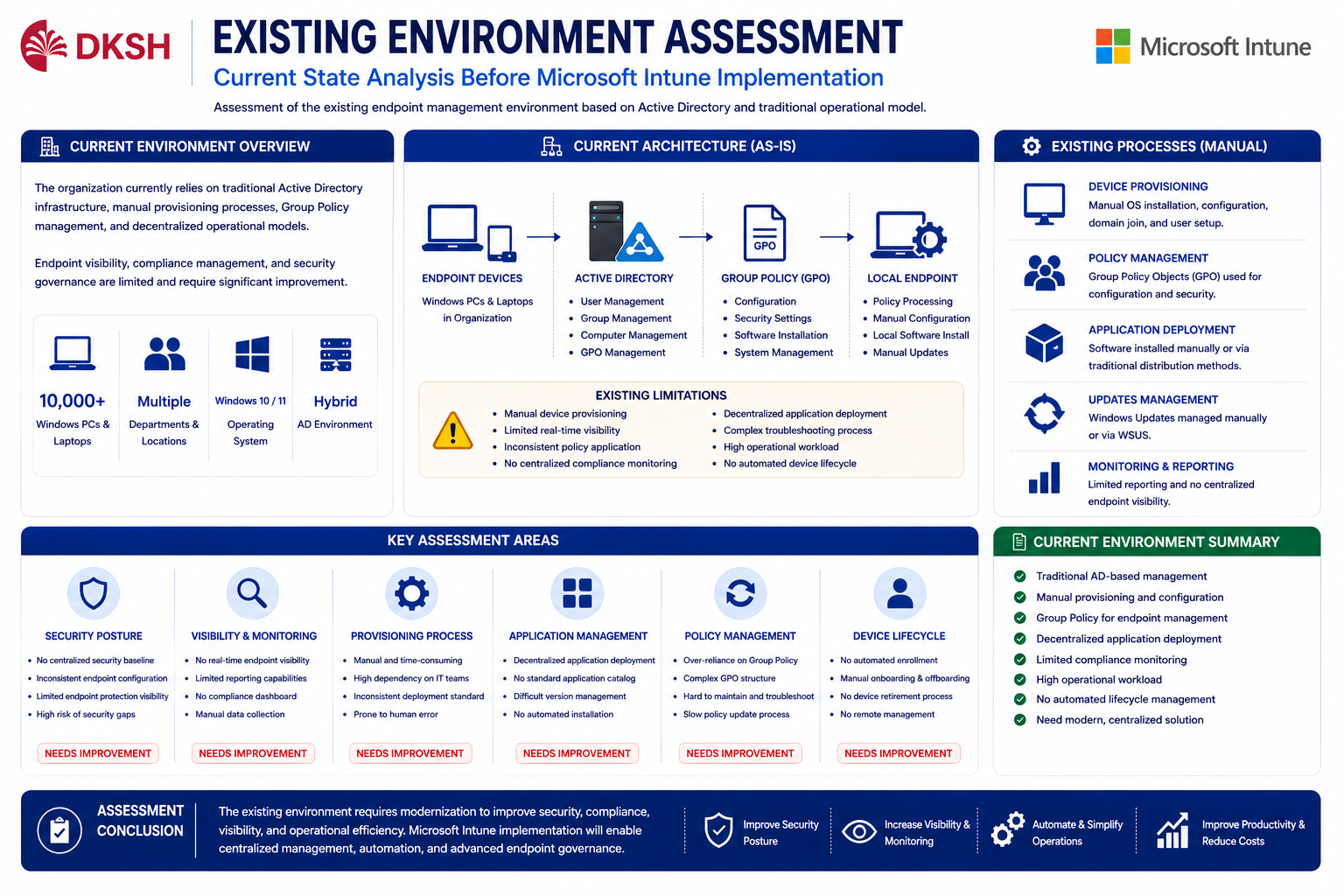
Existing Environment Assessment
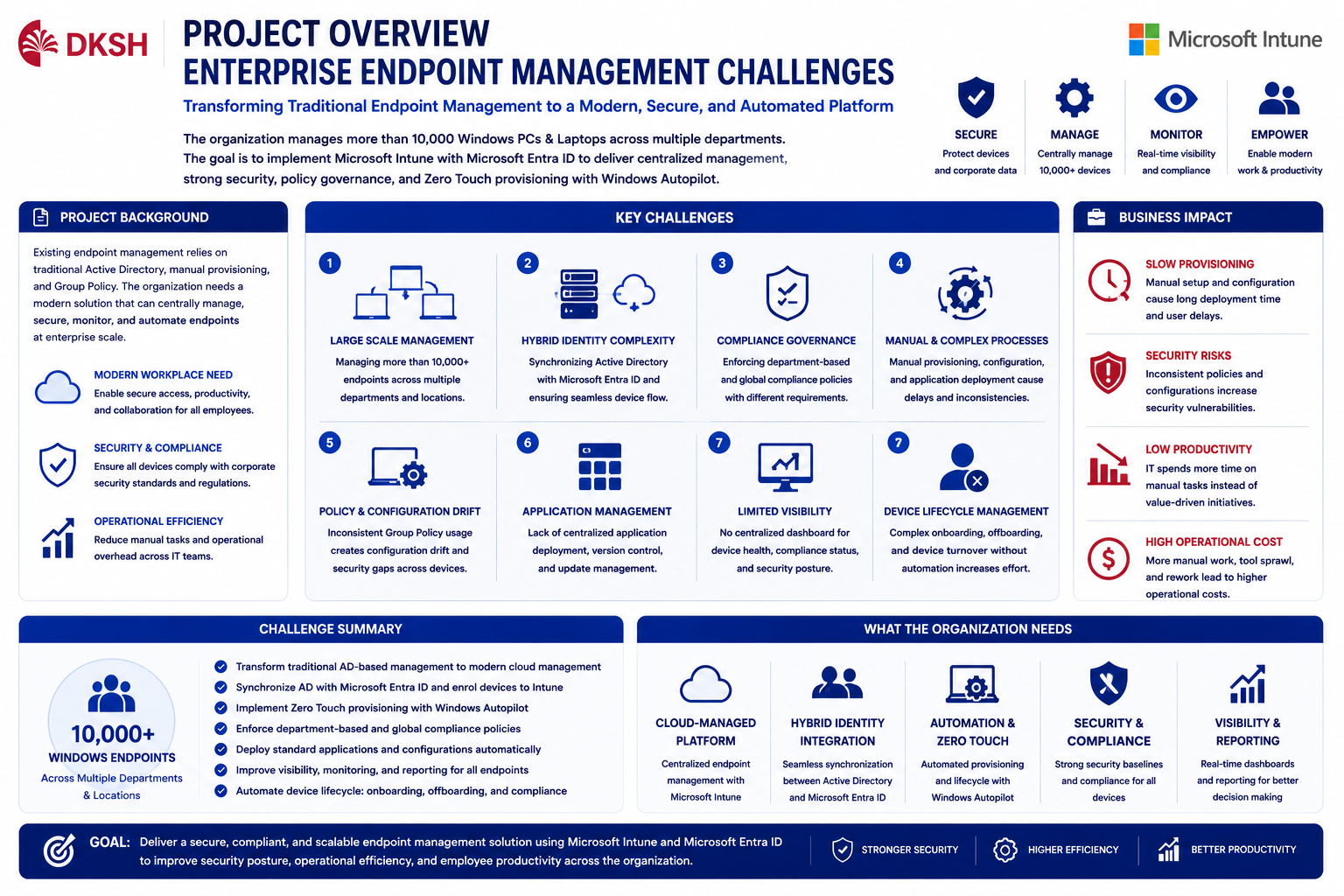
Before implementation, endpoint management primarily depended on traditional Active Directory environments and legacy operational deployment processes.
Device provisioning activities were still handled manually, including Windows installation, domain join, Group Policy processing, and standard application installation.
Existing operational limitations included:
- Limited endpoint visibility
- No centralized compliance dashboard
- Manual endpoint provisioning processes
- Complex onboarding procedures
- Inconsistent policy assignments
- Difficult remote administration
- Traditional GPO dependency
- No centralized cloud-based endpoint governance
These limitations increased operational workload, reduced deployment consistency, and complicated large-scale endpoint administration.
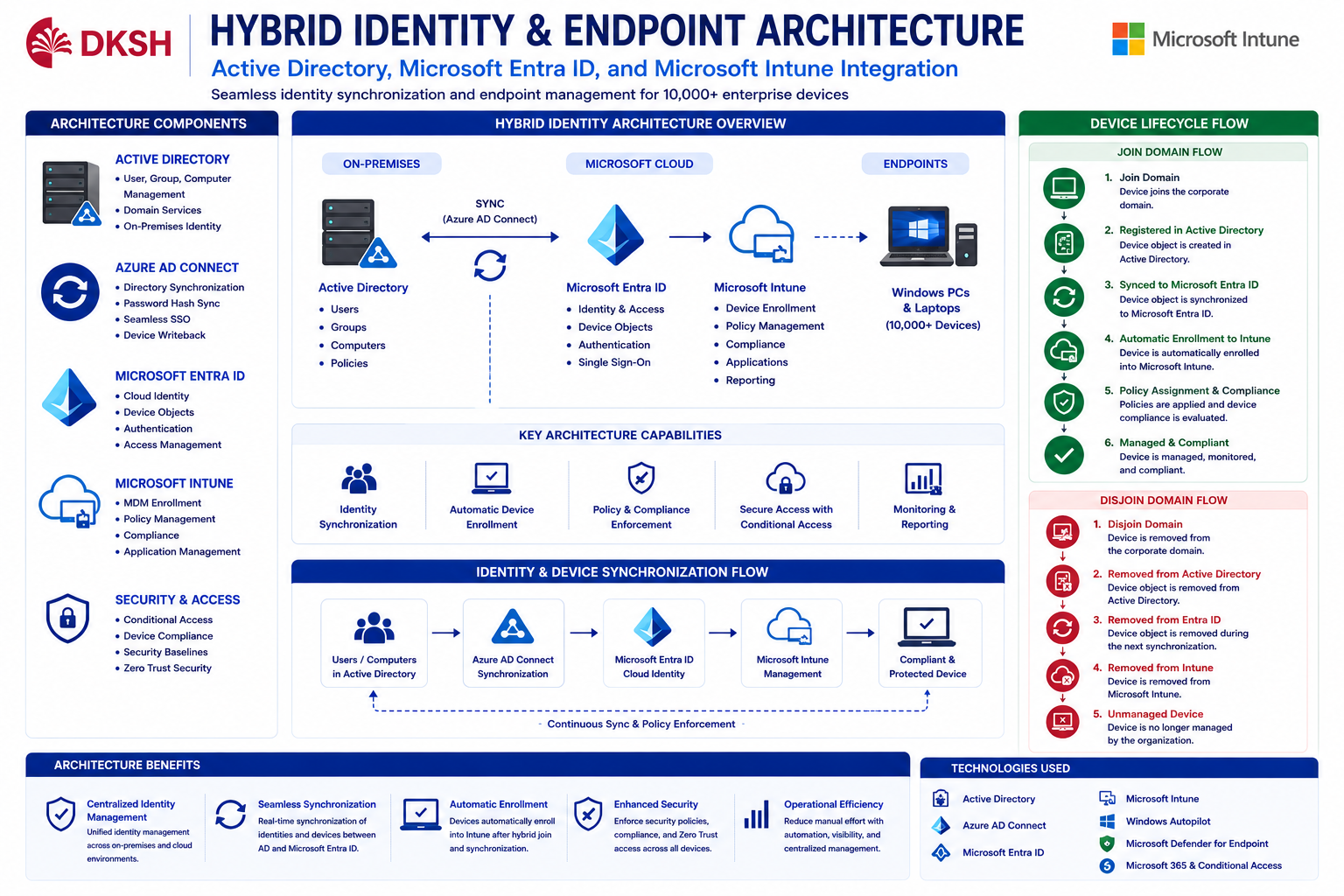
Hybrid Identity Architecture
Hybrid Identity architecture was implemented using Active Directory, Azure AD Connect, Microsoft Entra ID, and Microsoft Intune to create centralized cloud-managed endpoint governance.
Device lifecycle synchronization process:
Join Domain → Active Directory → Microsoft Entra Synchronization → Automatic Intune Enrollment → Policy Assignment → Compliance Evaluation
Device Offboarding Flow:
Disjoin Domain → Removed from Active Directory → Synchronization Removed from Entra ID → Removed from Intune Management
Azure AD Connect synchronization ensured endpoint identities, device records, and user objects remained synchronized between on-premise Active Directory and Microsoft cloud services.
Automatic MDM enrollment was configured to ensure Hybrid Joined devices automatically registered into Microsoft Intune after successful synchronization.
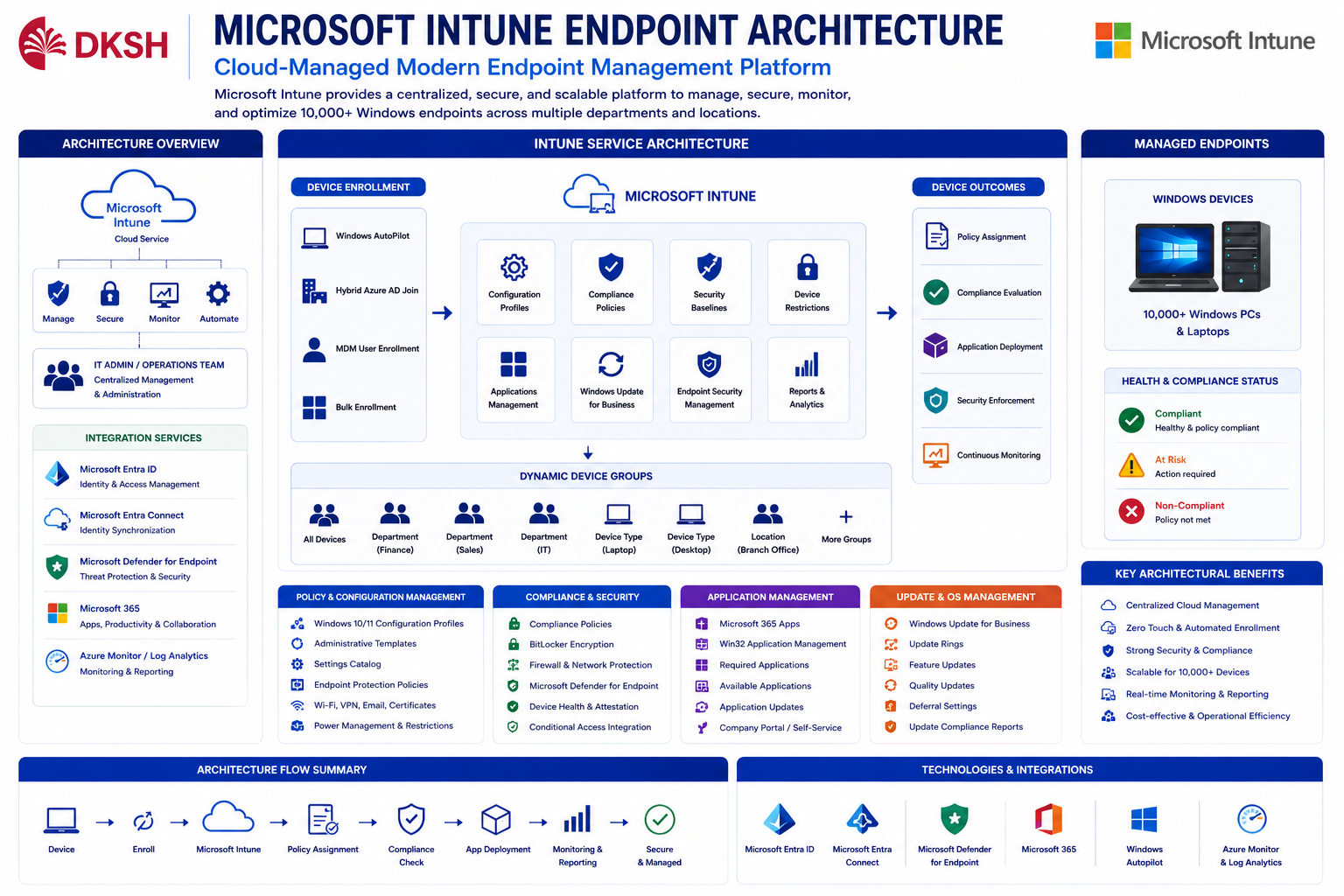
Microsoft Intune Endpoint Architecture
Microsoft Intune was implemented as the centralized enterprise endpoint management platform for Windows laptops and desktop devices.
Endpoint architecture included:
- Automatic device enrollment
- Dynamic device grouping
- Configuration profile assignment
- Security baseline deployment
- Compliance policy enforcement
- Windows Update Ring management
- Application deployment
- Defender integration
- Conditional Access integration
Dynamic Groups were utilized to automate policy assignment, application deployment, and compliance configuration based on department, device type, and operational requirements.
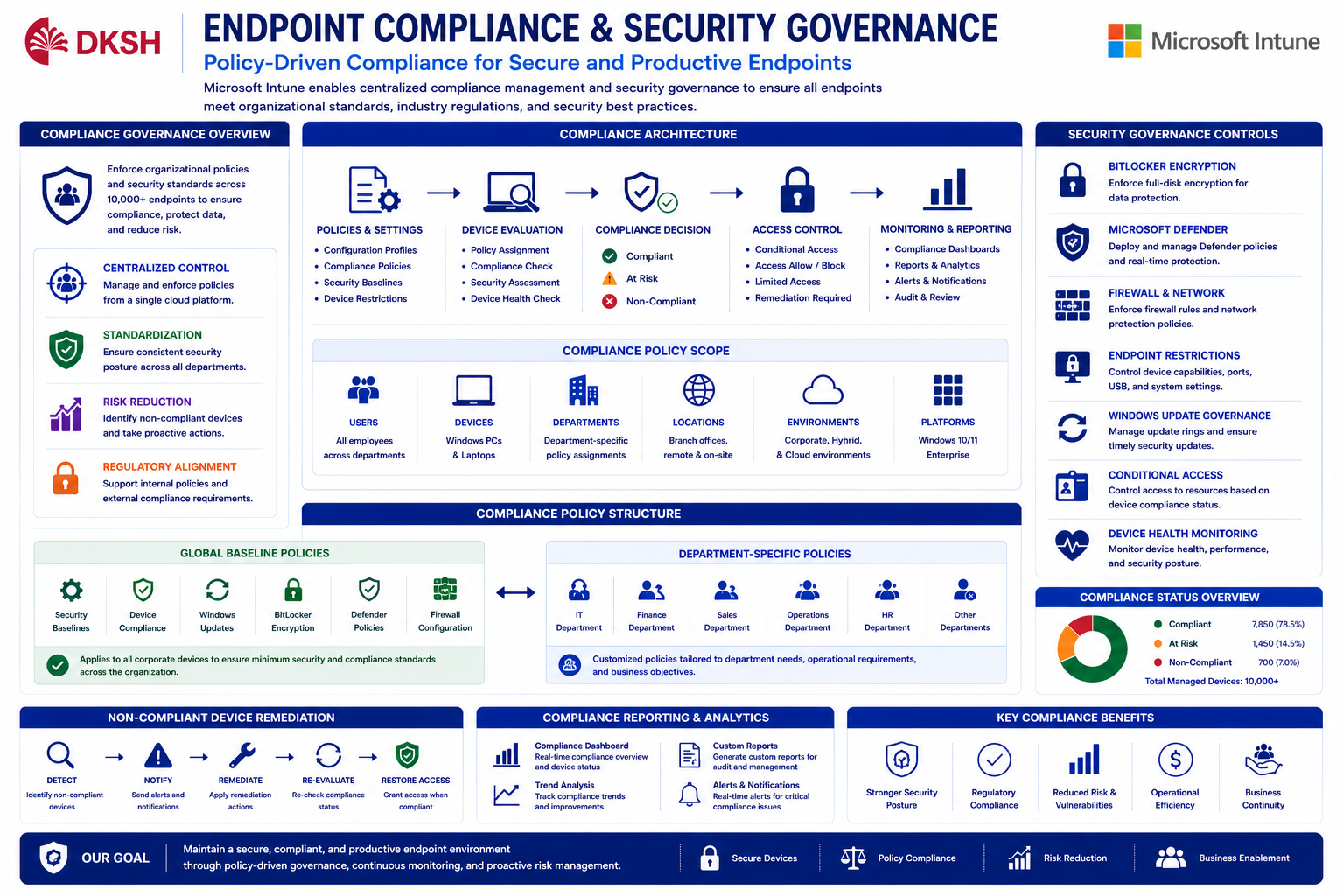
Compliance Policy & Security Governance
Enterprise compliance policies were implemented to enforce endpoint security standards, operational governance, and organizational compliance requirements.
Policies were divided into:
- Global baseline policies for all corporate devices
- Department-specific policies based on operational requirements
Security governance implementation included:
- BitLocker encryption enforcement
- Microsoft Defender configuration
- Firewall management
- Endpoint restriction policies
- Device health monitoring
- Compliance score evaluation
- Windows Update governance
- Conditional Access integration
Compliance evaluation determined whether endpoints could access enterprise applications and organizational resources.
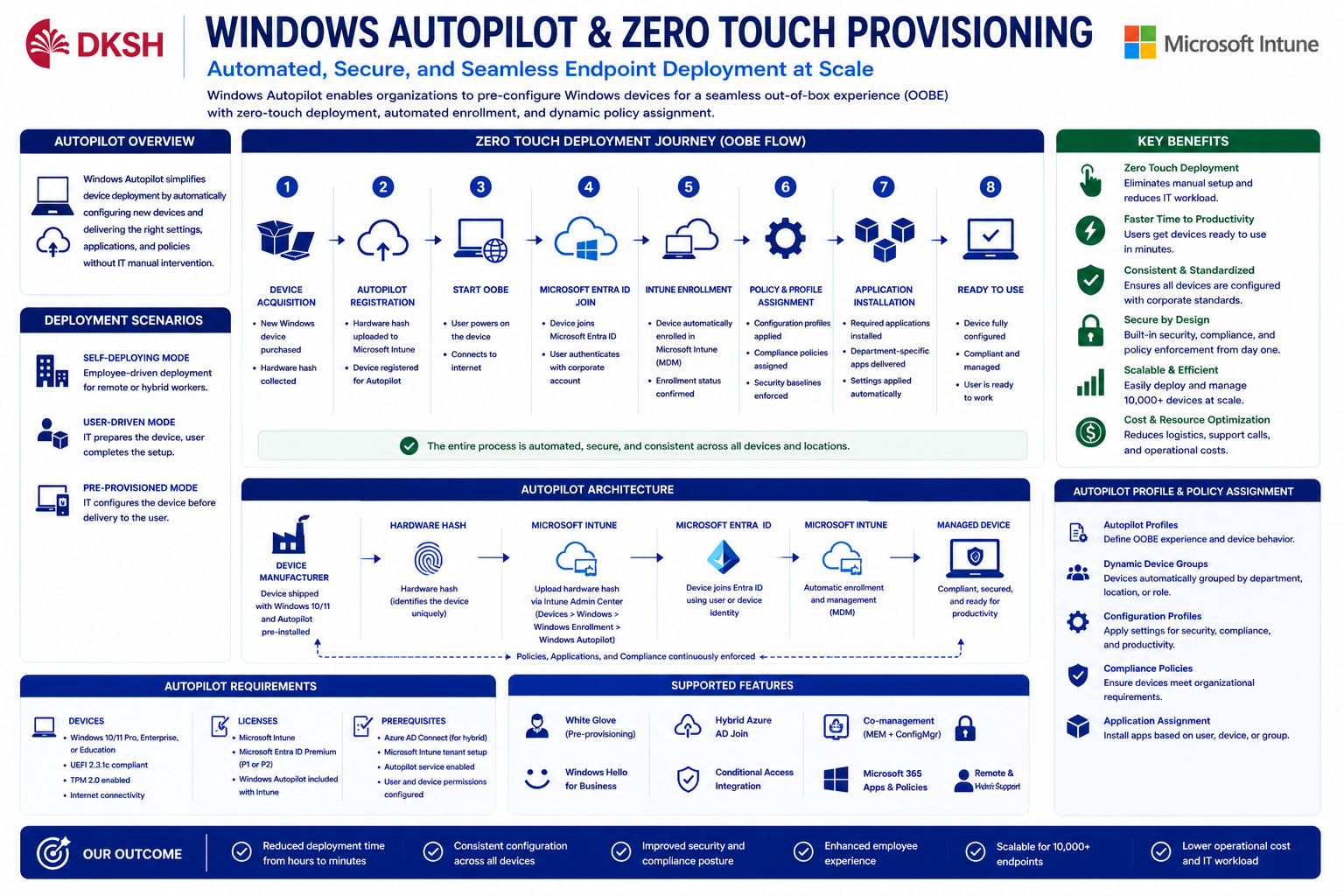
Windows Autopilot & Zero Touch Provisioning
Windows Autopilot implementation enabled Zero Touch Deployment and automated endpoint provisioning for enterprise devices.
During out-of-box experience (OOBE), devices automatically:
- Registered into Microsoft Entra ID
- Enrolled into Microsoft Intune
- Received configuration profiles
- Installed standard applications
- Applied department-based policies
- Activated compliance governance
Dynamic Group assignment allowed automated policy targeting based on operational classifications, user departments, and deployment requirements.
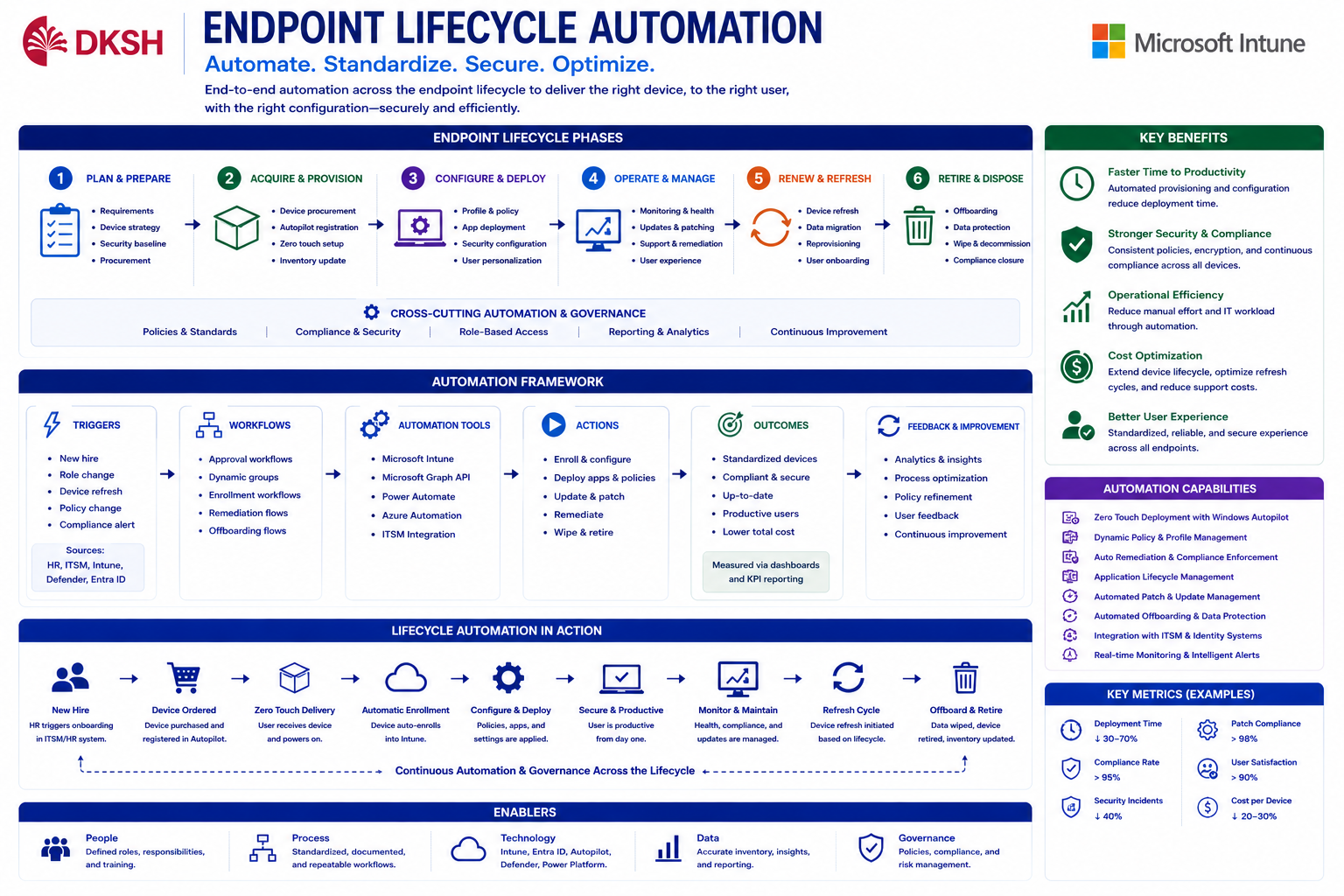
Endpoint Lifecycle Automation
Endpoint lifecycle automation simplified operational processes for onboarding, provisioning, compliance management, device retirement, and offboarding workflows.
Automated lifecycle activities included:
- Automatic device enrollment
- Automated compliance validation
- Device retirement management
- Endpoint wipe and reset
- Device ownership reassignment
- Dynamic policy reassignment
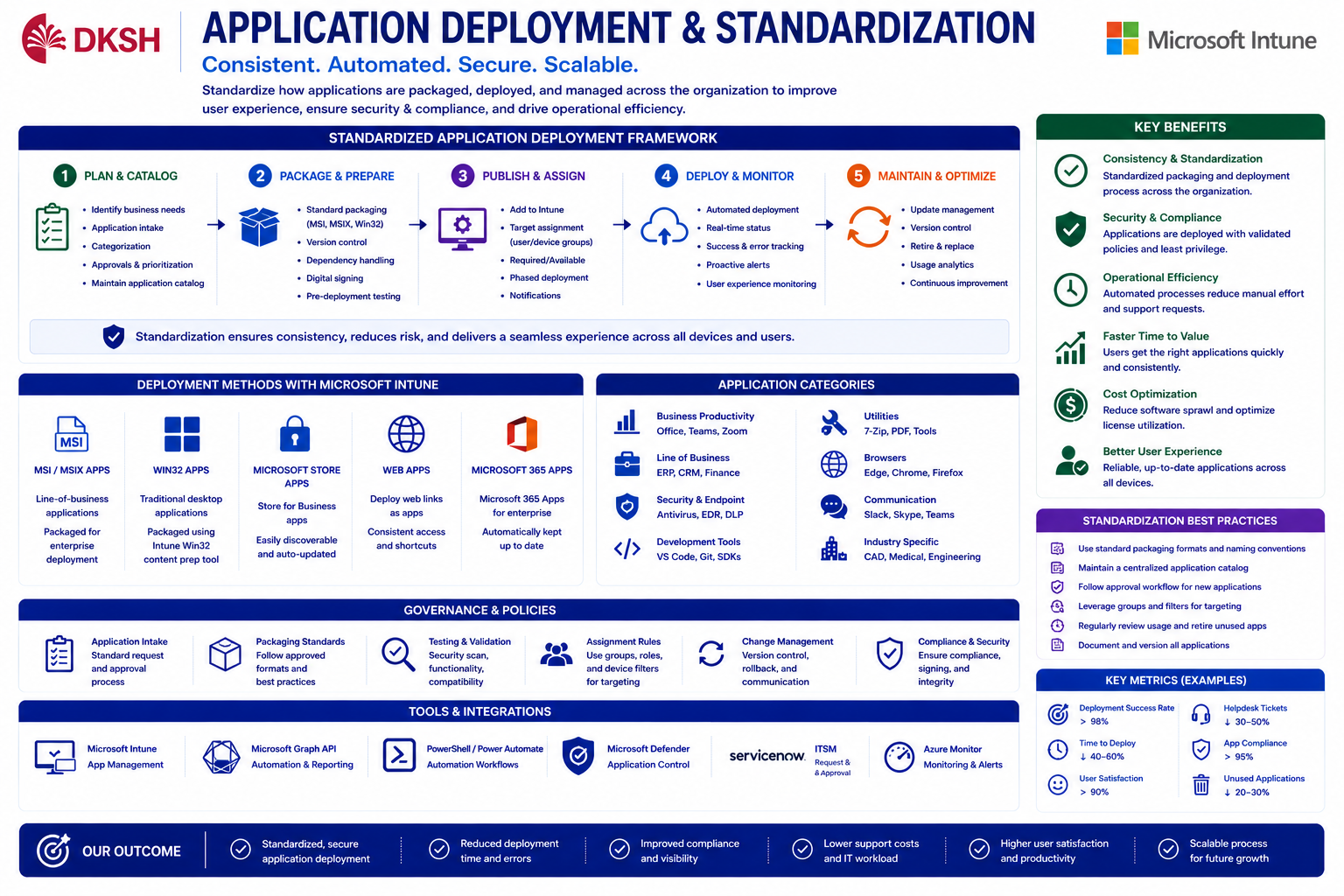
Application Deployment & Device Standardization
Enterprise application standardization was implemented using Microsoft Intune application deployment capabilities.
Standard applications were deployed automatically during Autopilot provisioning and endpoint enrollment processes.
Application governance included:
- Win32 application deployment
- Required applications
- Available applications
- Department-based app assignment
- Company Portal integration
- Application update governance
- Dynamic application targeting
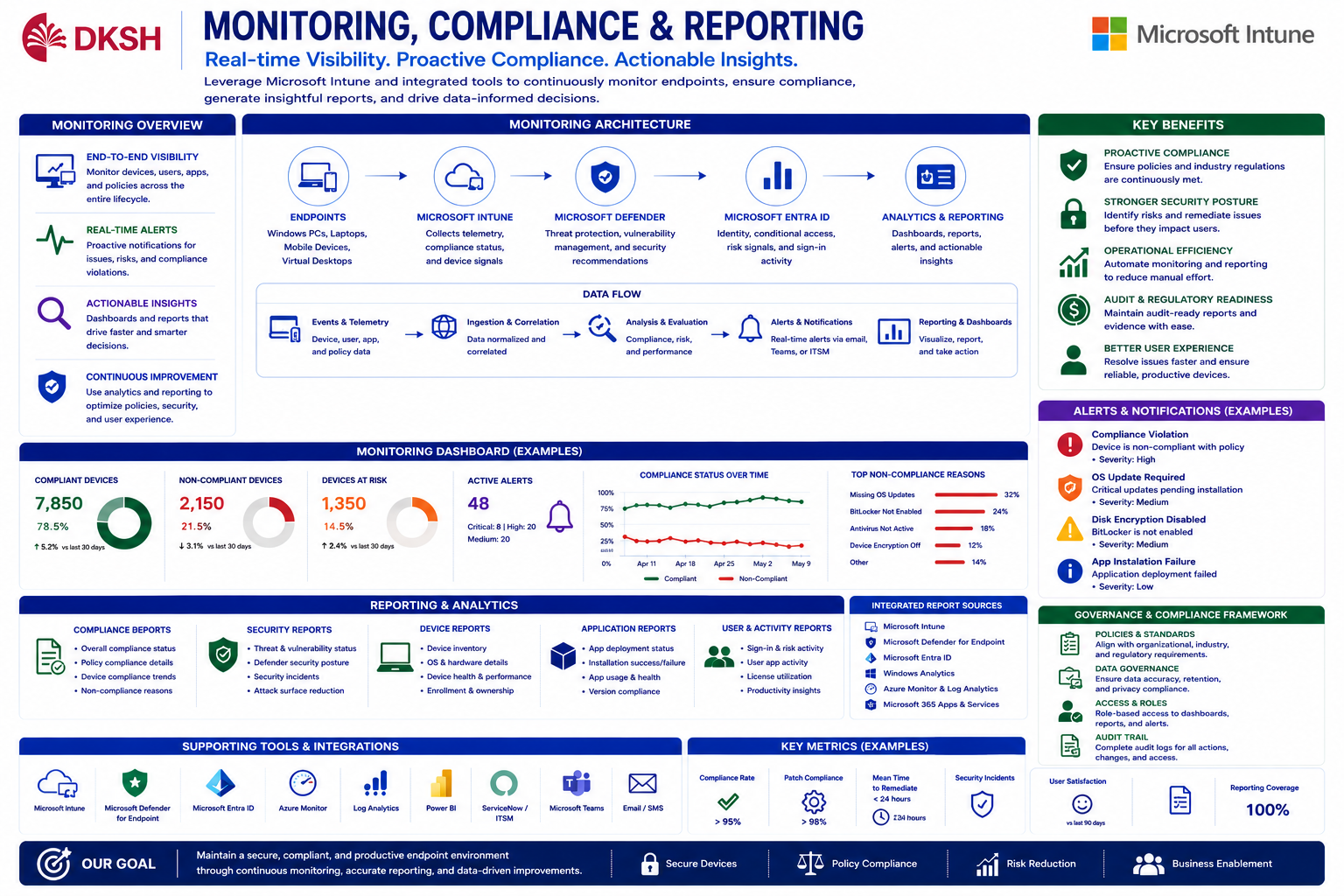
Monitoring, Compliance & Reporting
Centralized monitoring and reporting improved endpoint visibility, compliance governance, operational monitoring, and enterprise security administration.
Monitoring implementation included:
- Compliance dashboards
- Endpoint analytics
- Device health reporting
- Security posture monitoring
- Non-compliant device remediation
- Audit reporting
- Windows Update monitoring
Operational teams gained centralized visibility into endpoint conditions, deployment status, compliance score, and enterprise security posture.
Solutions & Business Outcomes
The implementation successfully transformed traditional endpoint management into a modern enterprise cloud-managed environment using Microsoft Intune, Microsoft Entra ID, and Hybrid Active Directory architecture.
Centralized endpoint governance significantly improved:
- Endpoint visibility
- Security posture
- Compliance management
- Deployment consistency
- Operational automation
- Provisioning efficiency
- Device lifecycle governance
Windows Autopilot reduced manual provisioning efforts while improving onboarding speed, endpoint standardization, and deployment scalability.
Microsoft Intune provided centralized cloud-native endpoint management capable of supporting more than 10,000 enterprise devices efficiently and securely.